shopify-embedded-apps
Shopify Embedded Apps
Shopify Apps that are setup to be Embedded will render in an iframe within Shopify Admin:
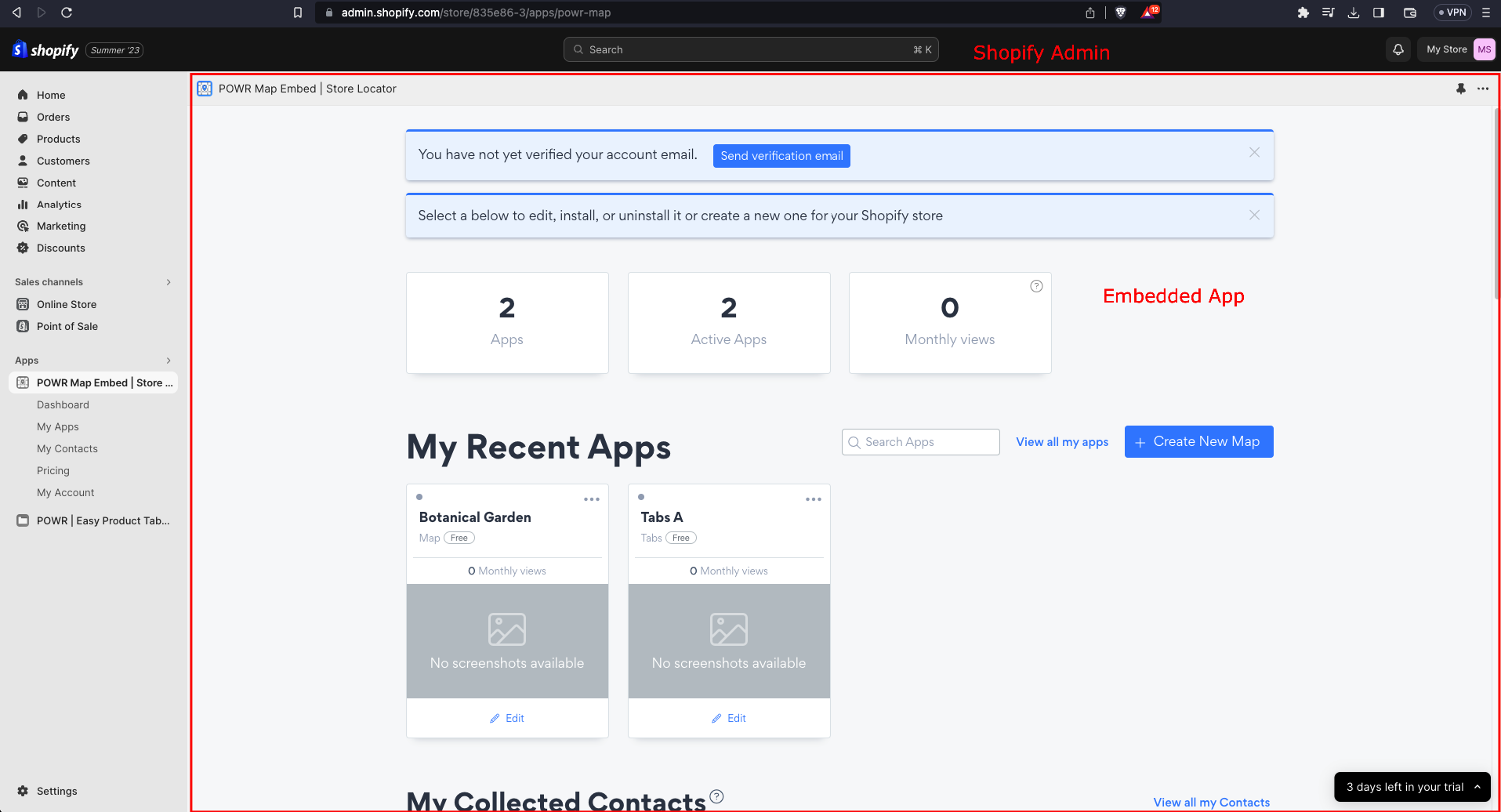
This way of rendering the Apps is done by using Shopify App Bridge. In order to have a Powr user session, the App Bridge requires to use Session Tokens instead of Cookies => https://www.youtube.com/watch?v=UJxg7Cbrqo0
We use the Shopify App Bridge calls only when the 3rd-party cookies are blocked. Now, the shopify admin allows cookies normally (unless the browser has 3rd-party cookies blocked). But, shopify auditors test our embedded apps in a 3rd-party cookied blocked environment. Furthermore, browsers like brave could have the 3rd-party cookies blocked.
App Bridge is supposed to function very well with SPA (single page applications). In our case we have a Multipage App, so Shopify recommends to convert it to behave like a SPA, using something like Turbolinks. => https://shopify.dev/docs/apps/auth/oauth/session-tokens. However, converting our project to Turbolinks has been considered to be beyond the scope at the time of this implementation, but we might look into that in the future.
So, instead of that recommendation, we are grabbing all redirects (links and also window.location) and are applying our own solution to make App Bridge work in our Multipage environment.
Implementation:
- Jason Web Token with App Bridge to create a session token that allows to replace the cookies with token and keep the session alive for the user.
window.getSessionStorage,window.setSessionStorage,window.getLocalStorage,window. setLocalStorage,window.removeLocalStorage=> these functions replace the direct calls to access session / local storage. Since we don't have access to that in shopify admin embedded, we have to check first.window.redirect=> this function replaces all the calls towindow.location = urlorwindow.location.href = url. For shopify admin embedded we need to add some params to the url.interceptClickEvent=> this function intercepts all clicks so we can check if the user clicked in a<a>tag. In this case we add some params to the url.shopify_app_bridge_controller.rb=> this controller doesn't need the user to log in, it allows to serve the skeleton page (wich loads the app bridge library), and also has a methodsave_jwt_in_redisthat allows to save the session token in redis.shopify_loader_page.html.haml=> this is the skeleton page, it doesn't need the user to be logged in. It's the first template to load when you just load the shopify admin embedded. It also runs the app bridge library and creates the first session token. Lastly it redirects according to params received.
JWT flow:
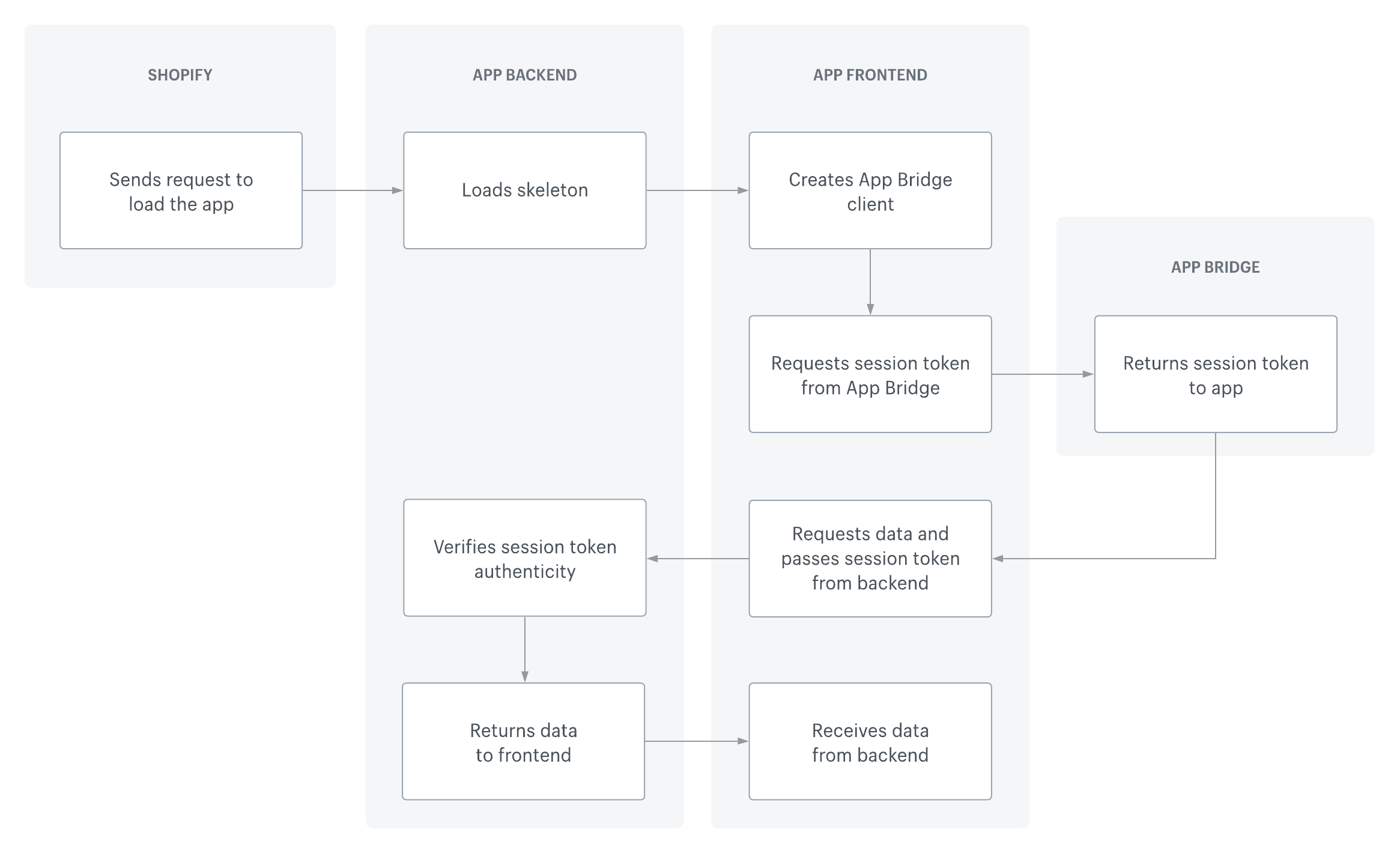
- Loads Skeleton - shopify_controller.rb > shopify_loader_page.html.haml
- Creates App Bridge client
- shopify_loader_page.html.haml > gets the app bridge library + creates the client
- application.html.haml > gets the app bridge library
- window.ajaxController > creates the client
- Requests Session Token from App Bridge - window.ajaxController > getSessionToken
- Requests data and passes Session Token to Backend - window.ajaxController > setRequestHeader
- Verifies Session Token auth - application_controller.rb > check_oauth_user
- Returns data to frontend - the controller that was called
- Receives data from backend - whatever page made the ajax call
Redirect Flow: we create the session token and save it in Redis. After that we do the redirect and validate the session token previously sent.
 Note: redirects don't accept headers, so we can't send the session token in the headers. Also we can't expose the session token by adding it to the url. That's why we have this flow.
There are some params that are needed in the url in most calls:
shopify_embedded_app_type: needed to get theappDetailwhich is necessary to do the login. If we don't have theapp_typeparam (like when the wobbly clicks in Pricing in the side menu) we get it from Redis using the shop param as key.shop: needed in order to be able to create a new app of a different app type, via dashboard.sjir: in the redirect calls this param is necessary to retrieve the Session Token from Redis. In regular ajax calls is not necessary because in those cases the Session Token is sent in the headers.