🔥 Fire - What to do when server is down or slow
Step 1: Take a deep breath. Oxygen is necessary to make good decisions.
Step 2: Start a google meet in fire channel and alert all engineers that are online.
quick meet link: meet.google.com/asz-scvc-faf
or type in start fire call
- Also post in engineering channel: Fire Master is now Frozen
- Remember to communicate status updates in fire channel.
Step 3: Diagnose Issue
*NOTE: If the team is not able to identify the issue in ~10 minutes and the server is down or unusable, call Ben (+1 610 737 3935) or Puru (628 333-5557) or Sergey (8-777-444-03-56) based on timezone. Contact info for other POWr rangers is here
Open Dashboards:
- Open heroku (https://dashboard.heroku.com/apps) and especially new relic - If you don't have access to heroku POWR - ensure you tag a sr. eng on fire call
- May be useful to see the live logs
heroku run logs -t -a powr - Did we recently make any pushes that correspond with the error?
- Check bugsnag channel.
- Check gitlab and updates channel to see when was the last deploy / a deploy that could possibly affect the broken page
Lots of timeouts in the logs and high request queuing in new relic => determine if issue is a specific endpoint or an underlying resource such as postgres, redis, or memory being overwhelmed.
Specific Endpoint Problems
Look at transactions in the lower left of new relic screen and click on any that are taking a long time to see if they are directly correlating with when the server is slow.
If a specific endpoint is causing problems:
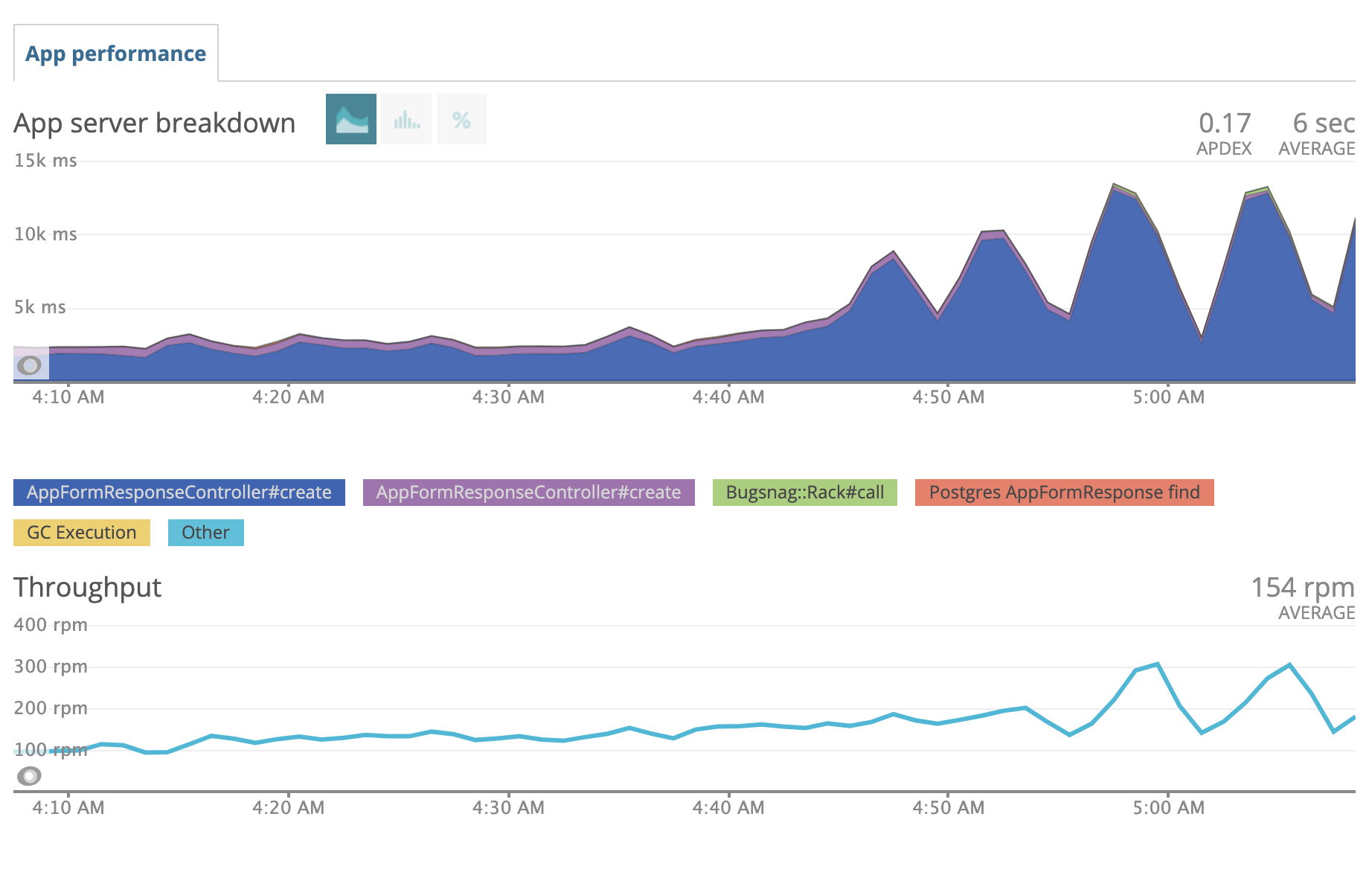 ^ throughput of app form response goes up at same time as server response time => there's your problem
- Immediately increase the dynos: https://powr.gitlab.io/docs/engineering/89
- Find out if a specific user or app is getting spammed. Eg for form responses
AppFormResponse.where('created_at > ?',5.minutes.ago).group(:app_id).count. Figure out how to stop them. - Be aware you can quickly block an IP address is cloudflare: https://powr.gitlab.io/docs/engineering/269.
Underlying Resource Problems
- Does postgres DB have problems?* Looks at db doc here: https://powr.gitlab.io/docs/database/409

Diagnosing sidekiq issues Look here: https://powr.gitlab.io/docs/engineering/416
Diagnosing REDIS issues
Check here: https://powr.gitlab.io/docs/engineering/417
Scout APM This is only for deep dives- avoid during fire https://powr.gitlab.io/docs/engineering/418
Step 4: Action
Server Rollback Procedure Is a major part of the site crashed or unusable?
- YES => Instant rollback https://powr.gitlab.io/docs/engineering/191
heroku features:disable -a powr prebootheroku rollback -a powrheroku features:enable -a powr preboot
- NO => Normal rollback:
heroku rollback -a powr
https://dashboard.heroku.com/apps/powr/activity
If you do not have access to heroku POWR - you should still be able to revert code from master How to revert code from master: https://powr.gitlab.io/docs/engineering/189
Reset DB Connections Are specific connections taking a super long time to run? Looks at db doc here: https://powr.gitlab.io/docs/database/409
Step 5: Documentation
- Alert fire channel with the progress and resolution of the issue
- Move non-fire communications out of the channel
- Create a fire doc with the details of what was discovered so people in other timezones can pick up where you left off